imgproxy vs. Vercel Images: Performance, Flexibility, and Cost
Compare imgproxy vs. Vercel Images on cost, performance, deployment, and flexibility. See which image pipeline fits your stack at scale.
When your application slows down, it’s tempting to blame backend logic or database latency, but in many cases, it’s images doing the heavy lifting. Images often account for over 40% of a webpage’s total weight; on mobile, that number climbs even higher.
For teams building with Next.js, Vercel’s built-in image optimization is a convenient and well-integrated solution. It handles modern formats, delivers assets through a global edge network, and requires little setup. But as your architecture grows more complex, spanning multiple frameworks, custom backends, or compliance needs, you may ask, “What happens if we want more control? Or if we move off Vercel?”
In this guide, we’ll compare Vercel images and imgproxy side by side, looking at deployment models, scaling tradeoffs, security, and long-term costs to help you choose the right image optimization strategy for your stack.
Before we break each point down, here’s how imgproxy and Vercel images differ at a glance.
Comparison table: imgproxy vs. Vercel images
| Aspect | imgproxy | Vercel images |
|---|---|---|
| Deployment model | Standalone, open-source server. Deploy anywhere (Docker, VM, Kubernetes). | Tightly coupled with Vercel’s platform and CDN. Only works inside Vercel deployments. |
| Flexibility | Framework-agnostic. Works with any frontend/backend stack. | Best with Next.js and the Vercel platform. Limited to non-Next.js apps. |
| Scalability | You choose a strategy and can optimize cost-performance trade-offs. | Auto-scales with Vercel infrastructure but tied to limits and pricing tiers. |
| Security | Signed URLs, token-based access, chained transformations. | Basic domain restriction with automatic rate limiting. |
| Cost model | Pay for the infrastructure you choose. Predictable at scale. | Bundled into hosting and bandwidth pricing. Per-image cost at scale. |
| Portability | Portable. Host on any cloud, self-host, or hybrid setup. | Locked into Vercel. Migration requires you to rework your image pipeline. |
While the table above provides a quick snapshot of how they compare and differ, let’s have a deeper breakdown to clarify.
Deployment models and infra ownership
Choosing between Vercel images and imgproxy comes down to architectural control. One gives you complete flexibility to deploy anywhere. The other works only inside its own ecosystem.
Vercel images
Vercel images depend entirely on Vercel’s infrastructure. It runs on Vercel’s edge network and works hand-in-hand with the next/image component; however, if you’re looking to push beyond that, you’ll encounter some challenges. While the initial setup is seamless, you can’t use its CDN or optimization outside its ecosystem. If you migrate off Vercel, you must:
- Rewrite image loaders
- Adjust CDN headers and cache strategy
- Lose built-in Next.js optimizations
imgproxy imgproxy is infra-agnostic. It’s a self-hosted, open-source image server you can deploy anywhere. You can create a custom image component similar to what you use in Next.js, which integrates well with imgproxy. Once you configure everything, you unlock unlimited transformations. You can run it as a Docker container:
# Run a Docker container in detached mode
docker run -d \

  # Set the IMGPROXY_KEY environment variable
  -e IMGPROXY_KEY=your_key \

  # Set the IMGPROXY_SALT environment variable
  -e IMGPROXY_SALT=your_salt \

  # Map port 8080 on your local machine to port 8080 in the container
  -p 8080:8080 \

  # Use the official imgproxy image from Docker Hub
  darthsim/imgproxy
With imgproxy, you have complete control over your image processing workflow, choose your preferred CDN, and have the flexibility to integrate with any cloud provider.
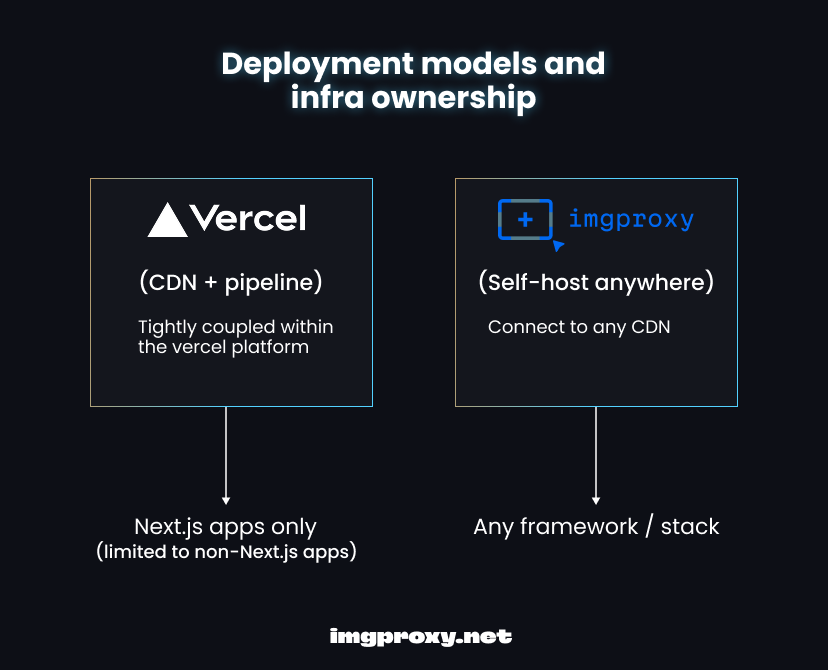
Understanding how deployment works for both tools and how each run isn’t all. Next, let’s talk about how they integrate with different frameworks, which can lead teams down very different paths.
Framework support beyond Next.js
An important area where Vercel images and imgproxy differ is how they support image optimization outside the Next.js framework.
Vercel images Vercel created its optimizer to work with Next.js. It handles autoscaling, SSL, and domain support with the Vercel platform; however, things can get limiting when your application stack goes beyond Next.js or your services require strict compliance. Developers report extra complexity, limited features, or lost optimizations outside Next.js.
imgproxy imgproxy is URL-driven. Any application or stack that can build a URL can request an optimized image.
Here’s a URL format snippet for imgproxy, including an example transformation that resizes an external image to 300×200 pixels:
https://imgproxy.example.com/insecure/resize:300:200/plain/https://example.com/image.jpg
This works with Astro, SvelteKit, Ruby on Rails, or static sites. When you migrate beyond Next.js, you don’t lose your image pipeline.
Once you’ve considered framework compatibility, the next step is understanding how these tools handle access, who can request what, and under what conditions.
Transforming images with secured access control
Exposing an image optimizer without controls is risky; a malicious actor could request to resize countless optimized image contents from your imgproxy instance, leading to high costs or causing a Denial-of-Service (DoS) attack.
Vercel images
Security is limited to domain restrictions and rate limiting. Signed or tokenized requests often break inside next/image. For example:
- GitHub issue: A Google Cloud Storage signed URL fails with
next/imageand causes a 500 internal error. - Lightrun case: Signed images from AWS S3 no longer work with
next/image, giving the error “The requested resource isn’t a valid image.” - Reddit comment: “Don’t use Vercel with presigned URLs; it makes your images public.”
Vercel images provide limited transformation parameters, such as width, quality, and image format (e.g., WebP, AVIF). It can also automatically select the best format based on the browser’s capabilities.
While Vercel charges per image transformation, it doesn’t offer strong security measures against abuse. A user could repeatedly request new transformations of your images, leaving you with an unexpected and inflated bill.
imgproxy
imgproxy gives complete control with URL signing, tokens, transformation chaining, and CDN delivery for security. You set a key/salt pair; every request includes an HMAC signature:
# This is a secret hex-encoded key used for signing image URLs
IMGPROXY_KEY=your_hex_key

# This is a secret hex-encoded salt used in combination with the key to generate secure, signed URLs
IMGPROXY_SALT=your_hex_salt
If a user tampers with URL parameters, the signature check fails, and imgproxy returns a 403 Forbidden error. You can also secure token-based access using custom headers, which your reverse proxy or CDN generally sets. Since imgproxy runs on your infrastructure, it provides a mix of out-of-the-box security features and multiple deployment options that allow you to lock down access the way you want.
imgproxy also supports secure chaining of multiple transformations in a single URL, such as resize, crop, watermark, blur, rotation, format conversion, filters, and other transformation chaining parameters.
https://imgproxy.example.com/secure/800x600/plain/filters:resize(800,0)/filters:crop(0,0,800,600)/filters:watermark(http://your-watermark-url.com/logo.png,position=bottom-right)/filters:blur(10)/filters:rotate(90)/filters:format(webp)/image.jpg?signature=your_generated_signature
This URL transforms the image on the fly by resizing it, cropping it, applying a watermark, blurring, rotating, and converting it to WebP format, while ensuring security with a signature.
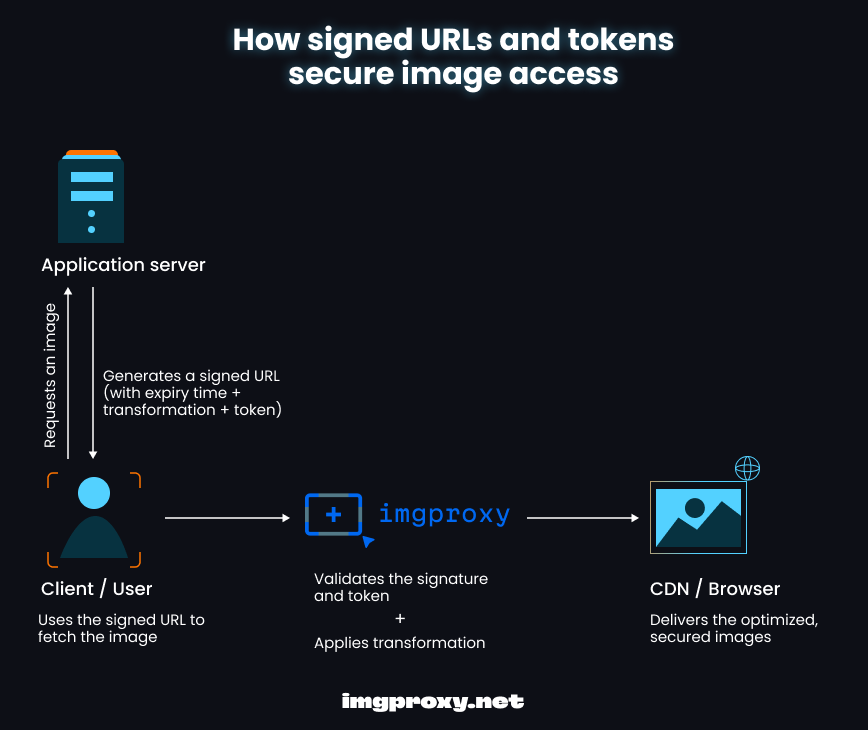
The diagram above shows how signed URLs and tokens secure image access. When a client requests an image, the application server generates a signed URL. The client then uses this signed URL to fetch the image. Upon receiving the request, imgproxy validates the URL, applies any required transformations, and delivers the optimized, secured image. Every process here ensures that only authorized requests succeed.
Locking things down is a critical factor. However, once access is secured, how well does your image optimization tool perform at scale in different scenarios?
Performance benchmarks
Performance is another key difference between Vercel Images and imgproxy. One lets you tune infrastructure and caching for speed; the other trades flexibility for simplicity.
Vercel images Performance is subject to Vercel’s edge network and caching. It’s fast for Next.js applications; however, tuning is limited, and cold starts can slow down remote or large images.
imgproxy Performance depends on your infrastructure. Deploy it close to users and pair it with a CDN like Cloudflare or Fastly, and you get low latency. You can also tune concurrency, caching headers, and image quality.
For a clearer view of response time, cold start, and CDN performance, let’s take a quick look at a simulated performance benchmark comparison of Vercel images and imgproxy:
| Scenario | Vercel images (ms) | imgproxy + CDN (ms) |
|---|---|---|
| Small image, cached | 80 | 60 |
| Large image, cached | 120 | 90 |
| Cold start | 400 | 200 |
Tuning with imgproxy means manually adjusting settings to optimize performance and behavior, which includes configuring:
- Caching headers: You can fine-tune HTTP cache behavior via response headers.
- Concurrency flags: imgproxy lets you control how many image requests run in parallel.
- Image quality: Developers can adjust compression and quality settings per request.
Raw performance tells you how fast each tool can go; however, what happens when traffic usage scales over time? That’s where scalability and cost become just as crucial in determining how both image optimization tools fit in the long term.
Scaling and cost models
The scale and pricing differences between Vercel images and imgproxy also help underscore a fundamental difference: Vercel images integrates deeply with the Vercel platform, and imgproxy is a self-managed solution.
Vercel images Vercel images free tier includes 5,000 images. After that, you get charged $5 per 1,000 images. The per-image cost grows at scale, which applies to Vercel’s Pro plan pay-per-use pricing that includes:
- 10,000 image transformations per month
- 600,000 image cache reads per month
- 200,000 image cache writes per month
Edge function timeouts and request size caps limit Vercel images. The cost grows quickly as traffic and image requests increase. Even for just a few transformations, your bill adds up.
imgproxy imgproxy offers a free tier through its open-source version. Your cost comes from the infrastructure you run (on AWS Lambda, Google Cloud Run, EC2, Docker, Kubernetes, etc.), either fixed or predictable, with the capability to scale horizontally or vertically. For high-volume apps, this can save thousands. For example, deploying imgproxy on Lambda lets you process images on demand without paying per-request fees to Vercel.
imgproxy also has its Pro version available for enterprise features and support. imgproxy Pro tier starts at:
- $49/month or $499/year (includes a 14-day free trial period) with 2 months free, including up to 16 workers across all instances
- Number of workers per instance = 2 x CPU cores e.g., if you run two instances with three workers each and two instances with four workers, that’s: (2 × 3) + (2 × 4) = 14 total workers
Workers are the parts of your server that process images simultaneously; the more workers, the more images handled at once, and the faster the performance.
Let’s briefly look at a cost scenario comparison of imgproxy and Vercel images.
| Scale | Vercel images | imgproxy |
|---|---|---|
| 50,000 images/mo | Approxiamtely $250 | Approximately $40 in infrastructure costs |
| 1M images/mo | Approxiamtely $5,000 | Approximately $300 in infrastructure costs |
Pricing and scaling are just a part of the decision. To choose the right tool, teams should also consider their tech stack, developer workflow, and how they plan to grow. That’s when it becomes clear which tool is the better fit.
Which should you choose?
Choosing between Vercel images and imgproxy is not only about features. Knowing when to use each tool helps engineers make the right call for any project. The best option depends on your tech stack, team size, and how sensitive you are to cost at scale.
| Team profile | Best fit | Why |
|---|---|---|
| Small team, all-in on Next.js + Vercel | Vercel images | Works out of the box and has no infrastructure to manage |
| Startup experimenting, low traffic | Vercel images | Cheap/free early on |
| Teams without infrastructure/DevOps experience | Vercel images | No infrastructure to manage |
| Large team, multi-framework stack | imgproxy | Framework-agnostic and integrates anywhere |
| Compliance-heavy apps (finance, health) | imgproxy | Complete control of pipeline + private hosting |
| Cost-conscious teams scaling to high traffic | imgproxy | Predictable costs based on your infrastructure |
| Teams needing advanced features (e.g., watermarking, filters, custom security) | imgproxy | Powerful configuration and image processing capabilities |
| Enterprise at scale | imgproxy Pro | Enterprise features, advanced performance, and support |
By understanding and considering these use cases for Vercel images and imgproxy, you will see that imgproxy stands out as the best alternative to Vercel images for efficient deployments at scale for your next project.
Conclusion: Moving beyond Vercel images
Both tools solve image optimization, but in very different ways. Vercel images is best for teams tied to its platform and comfortable with usage-based costs. imgproxy gives engineers complete control over their image pipeline, scalability, and freedom from vendor lock-in.
If your team is ready for enterprise-level features and dedicated support, request a copy and start a trial of imgproxy Pro today to experience the difference in control and advanced performance.
If you want to explore the open-source side, star the imgproxy GitHub repo to support the project and join the growing Discord community to learn from other engineers, ask questions, and share ideas.
Whether scaling a startup or running enterprise workloads, imgproxy offers a more flexible and cost-efficient path beyond Vercel images.